How to Make an AI Movie From a Script
Turn a script into a short film on Pika: let the Short Film app write and storyboard it, or direct each shot in Video Studio. Costs in dollars, checked 23 November 2026.
Tutorial
To make an AI movie from a script on Pika, you have two routes. Give a premise to the Short Film app and it writes the script, draws the storyboard and renders a multi-shot film. Or direct it yourself: build your cast once in Character Studio, generate each scene in Video Studio, and arrange the scenes on its timeline. Each generation shows its credit cost first, and no Pika plan adds a watermark.
The fastest route: the Short Film app
Open Short Film, sketch out the story and add reference images for your characters or locations. Pick a look (Auto, Cinematic, Documentary, Noir, Anime, Indie, Surreal or Sci-fi), a length, the model (Seedance 2.5 at 720p by default) and an aspect ratio. The app builds the script and the storyboard, then renders the film. Use it when you have an idea and want a first cut fast. Use the step-by-step route below when you already have a script and want to direct every shot.
What do you need before you start?
- A script, or a story you can tell in beats.
- A Pika account. Free has no monthly credits, so you buy a credit pack to generate.
- A look for each character: a description, a list of traits or a photo you have the right to use.
The process at a glance
| Stage | What you do | Where in Pika | What you end up with |
|---|---|---|---|
| 1. Break down | Split the script into scenes, then each scene into shots with one action each | Your script, or the Short Film app | A shot list |
| 2. Cast | Build each character and key location once | Character Studio, reference images | Character sheets in your Library |
| 3. Write | One prompt per scene: references, brief, timed shots, dialogue | Video Studio, or start from a Film template | Scene prompts |
| 4. Generate | Draft on a low-cost model, render the keepers on Seedance 2.5 or Wan 3.0 | Video Studio | Scene clips |
| 5. Review | Check faces, wardrobe, blocking and every line against the shot list | Your Library | Takes you keep |
| 6. Assemble | Arrange, trim and extend the clips in story order | Video Studio timeline, Extend Video | A rough cut |
| 7. Finish | Score, upscale and export | Pika Soundtrack, Upscale | The film |
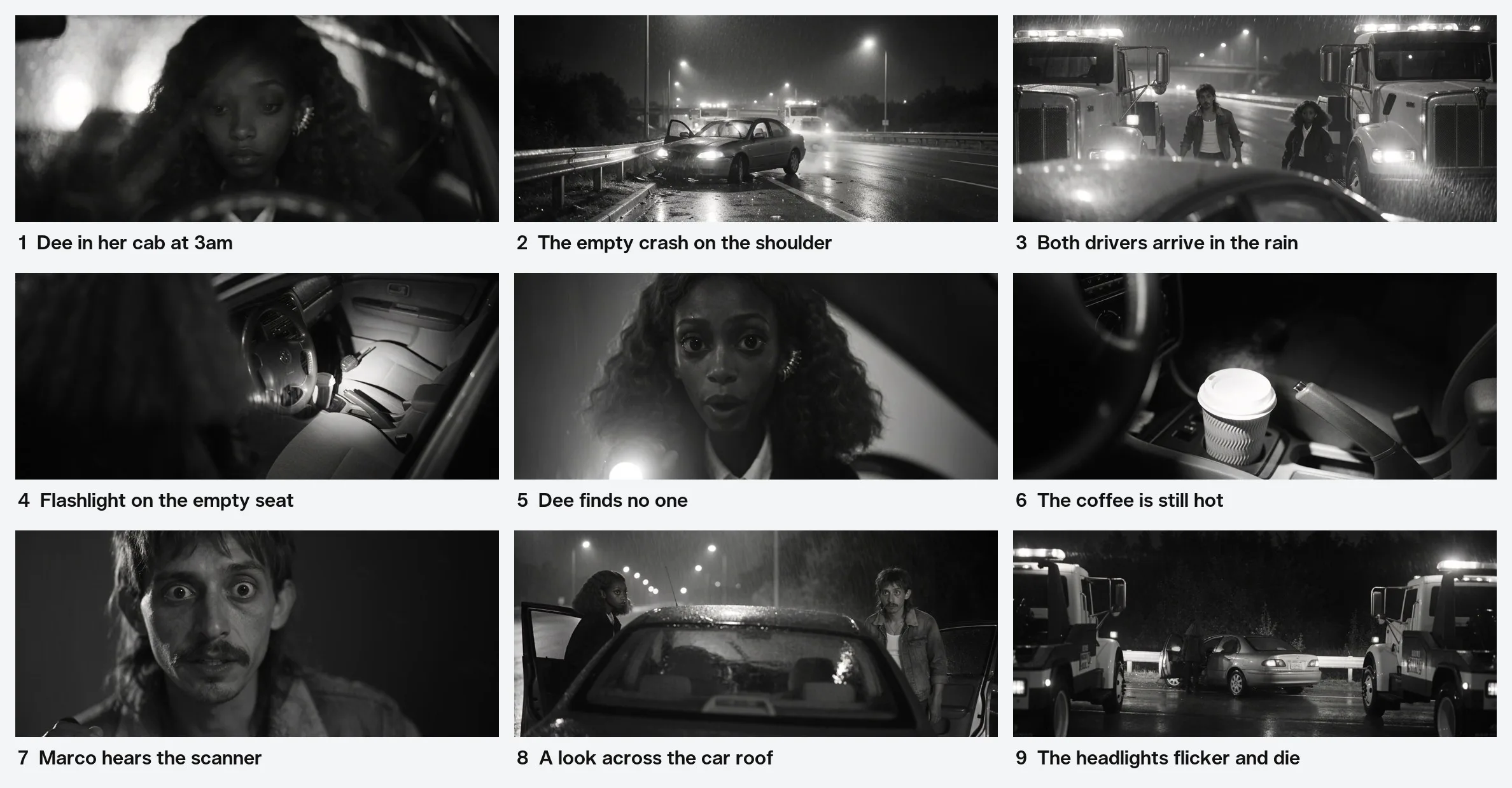
Here is stage 5 in practice. The script for Tow, the film at the top of this page, asked for nine shots in a fixed order. The finished clip kept the story, but it changed a few shots: there is no shot of Marco in his cab, the empty crash gets a shot of its own instead, and Marco's close-up arrives later, when the car's scanner speaks. Check every take against your shot list, and regenerate the scene when a beat you need is missing.
How do you turn a script into shots?
Give each shot one action and one place. Keep spoken lines short. Then send each part of the script to the Pika app that handles it.
| Script element | Where it goes in Pika |
|---|---|
| Characters | Character Studio makes a reusable character sheet. Save it to your Library |
| Locations and props | A reference image. In the prompt, references are @Image1, @Image2 and so on, in the order you add them |
| Action and camera | The shot prompt in Video Studio |
| Dialogue | Quotation marks inside the shot prompt |
| Mood and sound | Pika Soundtrack, or sound lines in the prompt |
| Order of scenes | The Video Studio timeline: arrange the shots, trim them and adjust the timing |
How do you make the film, step by step?
- Build each character. Open Character Studio, start from a description, traits or a photo, generate the sheet and check the views together. Save the character to your Library.
- Open Video Studio. Go to Video Studio and choose the Film video type, or Short Drama for a shorter story.
- Cast your characters. Attach the saved character, then type @ in the prompt to cast it.
- Write one prompt per scene. Name the setting, the action and the camera for each shot, with timings. Put each spoken line in quotation marks. About 30 spoken words fit in 15 seconds, as in Pika's UGC-style ads guide. With Seedance 2.5, one generation can hold several shots, up to 30 seconds.
- Generate in story order and review each clip. Compare the face, hairline, wardrobe and proportions against the character sheet before you move on.
- Extend or trim. Extend Video adds 5 to 15 seconds after a clip ends. On the Video Studio timeline, trim the clips and arrange them in story order.
- Add sound. Pika Soundtrack turns video into a synchronised soundscape of effects, voice, music and ambience, and Video Studio lists Soundtrack among its tools.
- Finish. Upscale the final shots to 4K with Upscale, then export from the timeline.
How to write a scene prompt
Every Film template in Video Studio is written the same way. Copy the structure and your scenes will hold together better.
| Part | What it does | Example line from a Pika template |
|---|---|---|
| References | Ties each name to an image, so faces and outfits stay put | "@Image1 is DEE, @Image2 is MARCO, @Image3 is the highway." (Tow) |
| Brief | Says what the film is: length, format, genre, tone | "A 15-second wordless action film." (Catching the Ferry) |
| Story | One or two sentences with a beginning, middle and end | "The judge tastes both: the giant one is watery, the tiny one is perfect." (Giant Tomato Show) |
| Shots and beats | Numbered or timed shots, one action and one camera move each | "SHOT 2: profile close-up of the driver, hands tight on the wheel." (Brothers at the Pump) |
| Dialogue | The exact line in quotation marks, with who says it | The passenger says: "You told Mum it was my idea." (Brothers at the Pump) |
| Continuity rules | How many people, who stands where, what never changes | "EXACTLY TWO PEOPLE, never duplicated, nobody else." (Tow) |
| Look and light | Colour, grade, lens and light sources | "True black and white, no colour, no sepia." (Tow) |
| Sound | What we hear, and what we do not | "Sound: dialogue only, plus a car engine idling. No music." (Brothers at the Pump) |
A scene prompt you can copy and fill in:
@Image1 is [NAME], @Image2 is [NAME], @Image3 is the [location].
[Ratio] short film, [length] seconds, [number] shots, hard cuts, [genre and tone].
Story: [one sentence with a beginning, middle and end].
SHOT 1, 0-4s: [shot size and camera move]. [Who does what]. [NAME] says: "[short line]"
SHOT 2, 4-8s: ...
Continuity: exactly [number] people. [NAME] keeps the face, hair and outfit from their image in every shot.
Look: [colour, grade, lens]. Light: [real light sources].
Sound: [dialogue, effects, ambience]. No music.
Five habits the templates share:
- Give every shot a time range. "0-4s" tells the model what happens when.
- One camera move per shot. "Slow push-in" or "low tracking shot", not both.
- Keep dialogue short: about 30 spoken words per 15 seconds.
- Say what you do not want: no music, no on-screen text, no slow motion.
- Write names in capitals and use the same name every time, so the model never invents a third character.
What does a scene prompt look like?
Here is how the Catching the Ferry template turns a one-line idea into a script the model can shoot. Open the template in Video Studio to see the full prompt.
[Brief] A 15-second wordless action film. A young man sprints through a sunlit island harbour to catch a ferry that has already left, and makes the jump.[Shots & Beats] 00-04s: An aggressive FPV drone dives down a steep whitewashed stairway with cobalt-blue railings and catches him mid-sprint from behind. [...] 04-07s: Hard cut to a low tracking shot alongside him on the quay. He vaults a stack of bright yellow fish crates. [...] 07-11s: He plants one foot on the bollard and launches. [...] 11-15s: The crane rises up and back off the stern to reveal the harbour shrinking behind them.
One reference image (@Image1) holds his face and outfit, the brief says what the film is, and each timed beat is one shot with one camera move. That is a script broken into shots.
More films made from one prompt each
Each of these is a Video Studio template. Open it to read the full prompt and remix it with your own story.
What does a short film cost?
Here is a six-shot film with each shot 5 seconds long, one generation per shot and no retakes.
| Model | Setting | Credits per shot | Credits for six shots | Six shots on Starter ($10) | Six shots on Creator ($35) |
|---|---|---|---|---|---|
| Pika H3 Flex | 768p | 10 | 60 | $1.00 | $0.81 |
| Pika 2.5 | 720p | 20 | 120 | $2.00 | $1.62 |
| Wan 3.0 | 720p | 33 | 198 | $3.30 | $2.67 |
| Seedance 2.5 | 720p | 122 | 732 | $12.20 | $9.85 |
| Seedance 2.5 | 1080p | 299 | 1,794 | $29.90 | $24.15 |
Prices checked 23 November 2026 on pika.art/pricing. Starter is $10 a month for 600 credits, so the Seedance 2.5 720p version does not fit in one Starter month. Creator is $35 a month for 2,600 credits. Credit packs give 60 credits per $1. Every retake costs the same as the first take, so rough out the sequence on a lower-cost model and keep the expensive passes for the shots the film hangs on.
What are the limits?
- Clip length depends on the model. Pika H3 Flex generates up to 15 seconds of synchronised video and stereo audio, according to its technical deep dive from 29 October 2026, and Seedance 2.5 makes multi-shot videos of up to 30 seconds. A longer film is several of those, arranged on the timeline.
- Characters can drift between shots. Pika's consistent character guide calls a shared reference a workflow, not a guarantee, so review every shot.
- Retakes add up. Budget more credits than the table shows.
- Free has no monthly credits. The commercial licence starts with Starter.
How does Pika compare with Runway for a short film?
The six Seedance 2.5 shots at 720p cost $9.85 on Pika Creator. On Runway Pro, at the same $35 a month, the same six shots cost about $14 (150 credits per 5-second shot). Runway lists Seedance 2.5 from Pro; on Pika it also runs on the $10 Starter plan. Pika also puts the whole pipeline in one place: Short Film for a first cut, Character Studio for the cast, Video Studio with models from Pika, ByteDance, Kling, Alibaba, MiniMax, xAI and Google for the shots, and Pika Soundtrack for the score. Runway prices checked 23 November 2026 on runway.com/pricing and its help-centre pricing table.
FAQ
How do I make an AI movie? For a fast first cut, give your premise to the Short Film app. To direct it yourself, split your script into shots, build your characters in Character Studio, generate each scene in Video Studio, then arrange, extend and score the clips.
What are the best tools for turning a script into a video? On Pika, Short Film turns a premise into a script, storyboard and film, Character Studio holds your cast, Video Studio generates and assembles the shots, and Pika Soundtrack adds sound. Video Studio lets you pick between models such as Pika H3 Flex, Seedance 2.5, Wan 3.0 and Kling 4.0 for each shot.
How do I choose a script to video tool as a beginner? Check four things: does it show the cost before you generate, can it keep a character across shots, can it add sound, and does it add a watermark. Pika shows a credit quote before every generation, and no Pika plan adds a watermark.
How long can an AI movie be? As long as the clips you cut together. Each clip's length depends on the model, so check the model in Video Studio.
Can I use an AI movie commercially? Starter, Creator and Fancy include a commercial licence. Free does not. Prices checked 23 November 2026 on pika.art/pricing.
Make it happen here: Video Studio